

Summary
This article provides steps for troubleshooting data retrieval from Microsoft App-V.Synopsis
You are having troubles to retrieve data from Microsoft App-V for Spider.
Discussion
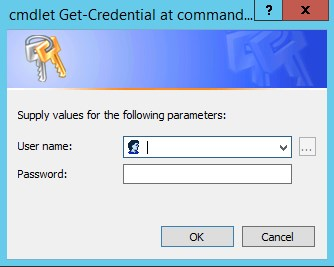
- Get Credentials to connect to App-V server (keep in mind that if you're running the Command without credentials it is using the logged in user which might end in different results
$cred = Get-Credential
- Greate a PowerSHell Session on the target (App-V) server
$psSession = New-PSSession -computerName "appvserver" -Authentication Kerberos -Credential $cred
- Run the Get-AppVServerPackage command to get a list of packages in the context above
Invoke-Command -Session $psSession -ScriptBlock {Get-AppVServerPackage } | ft

Whenever you get a PowerShell error, examine and solve it
Additional Information
Products
SWR6
Was this helpful?






0/255
Upload Attachment
File Upload
Maximum file
size allowed is 3 MB.
Supported file types:
Documents (.txt, .doc, .docx, .pdf), Images (.jpg, .png), Comma Separated Files
(.csv) Speadsheets (.xlsx, .xls)
Are you sure you want to cancel the case creation?
Case closed successfully
File Upload
Maximum file size allowed is 3 MB.
Supported file types:
Documents (.txt, .doc, .docx, .pdf), Images (.jpg, .png), Comma Separated Files
(.csv) Speadsheets (.xlsx, .xls)
Are you sure you want to close this case
| Products | Region | Phone Numbers |
|---|---|---|
| FlexNet Operations FlexNet Embedded FlexNet Publisher FlexNet Connect FlexNet Code Insight InstallAnywhere InstallShield |
North America * |
+1 630-332-2513 (toll) +1 877-279-2853 (toll-free in North America) |
| Europe * |
+44 1925 944367 (toll) +44 800 047 8642 (toll-free in Europe) |
|
| Japan * | +81 3-4540-5335 (select option 2) | |
| Australia * |
+61 3 9895 2177 +61 1800 560 603 (toll-free in Australia) |
|
|
Usage Intelligence (formerly
Revulytics) Compliance Intelligence |
Please use the Case Portal to submit your support ticket or reach out to your Revenera contact. | |
File Upload
Maximum file
size allowed is 3 MB.
Supported file types:
Documents (.txt, .doc, .docx, .pdf), Images (.jpg, .png), Comma Separated Files
(.csv) Speadsheets (.xlsx, .xls)
Revenera Assistant



Case id: 00001065
Activity: Status change: 2 hours ago