

Summary
How to customize the Windows files properties of an installer .exe file
Synopsis
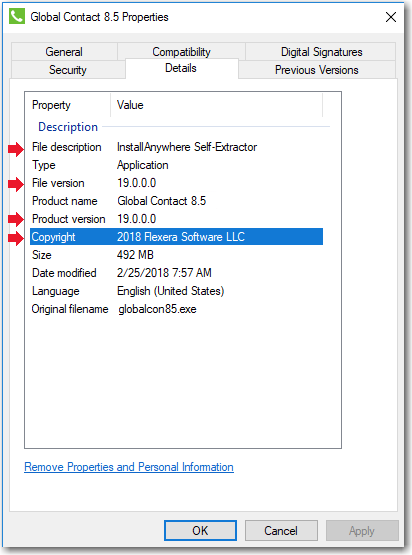
In previous releases, when you viewed the Details tab of the Windows Properties dialog box for an InstallAnywhere installer .exe file, information specific to the version of InstallAnywhere used to create the installer was displayed instead of information specific to the product being installed. The following hard-coded values were displayed for all Windows .exe installers created using InstallAnywhere:
- File description: Displayed InstallAnywhere Self-Extractor.
- File version: Displayed the version of InstallAnywhere that was used to create the installer.
- Product version: Displayed the version of InstallAnywhere that was used to create the installer.
- Copyright: Displayed InstallAnywhere?s copyright information.
Details Tab of Windows Properties Dialog Box:
Discussion
For Windows installer .exe files created using InstallAnywhere 2018, the project-specific values entered on the Project > General Settings page of the InstallAnywhere project file are now displayed on the Details tab of the Windows Properties dialog box, instead of the previously hard-coded values.
NOTE: This will only apply when building the installer on a Windows machine. It will not be possible to change the .exe properties at build-time when on a non-Windows platform. Third-party resource editors can be used to modify the .exe properties post-build.
Additional Information






Are you sure you want to cancel the case creation?
Are you sure you want to close this case
| Products | Region | Phone Numbers |
|---|---|---|
| FlexNet Operations FlexNet Embedded FlexNet Publisher FlexNet Connect FlexNet Code Insight InstallAnywhere InstallShield |
North America * |
+1 630-332-2513 (toll) +1 877-279-2853 (toll-free in North America) |
| Europe * |
+44 1925 944367 (toll) +44 800 047 8642 (toll-free in Europe) |
|
| Japan * | +81 3-4540-5335 (select option 2) | |
| Australia * |
+61 3 9895 2177 +61 1800 560 603 (toll-free in Australia) |
|
|
Usage Intelligence (formerly
Revulytics) Compliance Intelligence |
Please use the Case Portal to submit your support ticket or reach out to your Revenera contact. | |
Revenera Assistant



Case id: 00001065
Activity: Status change: 2 hours ago