

Summary
The Spider setup warns about the vCenter Invalid Certificate Action not being set to ignore.
Cause
The vCenter PowerShell Command Line Interface checks the validity of the server certificate upon connecting to the vCenter/ESX server. If the InvalidCerticateAction ist not set to ignore and the certificate is not valid, the connector will not connect.
The setting can be checked by issuing:
Get-PowerCLIConfiguration
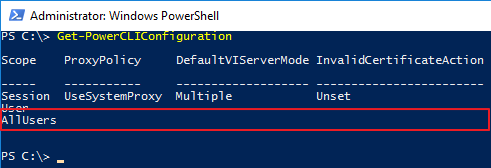
The InvalidCertificateAction has to be set for "AllUsers" so the service is also covered by the setting.
Resolution
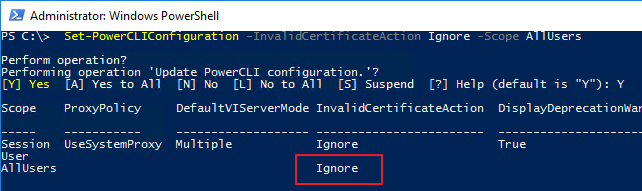
In case the action is NOT set to ignore you can issue the following command (start PowerShell as Administrator) to change the setting.
Set-PowerCLIConfiguration -InvalidCertificateAction Ignore -Scope AllUsers
Additional Information
vSphere PowerCLI Reference - Set-PowerCLIConfiguration
Products
SDC






Are you sure you want to cancel the case creation?
Are you sure you want to close this case
| Products | Region | Phone Numbers |
|---|---|---|
| FlexNet Operations FlexNet Embedded FlexNet Publisher FlexNet Connect FlexNet Code Insight InstallAnywhere InstallShield |
North America * |
+1 630-332-2513 (toll) +1 877-279-2853 (toll-free in North America) |
| Europe * |
+44 1925 944367 (toll) +44 800 047 8642 (toll-free in Europe) |
|
| Japan * | +81 3-4540-5335 (select option 2) | |
| Australia * |
+61 3 9895 2177 +61 1800 560 603 (toll-free in Australia) |
|
|
Usage Intelligence (formerly
Revulytics) Compliance Intelligence |
Please use the Case Portal to submit your support ticket or reach out to your Revenera contact. | |
Revenera Assistant



Case id: 00001065
Activity: Status change: 2 hours ago