

Summary
This article provides steps for renewing your SSL certificate.
Synopsis
You already have activated SSL but your certificate for Spider Operations Manager has been expiring and you need to update to the new certificate.
Discussion
Please follow these steps:
- Download the following file:
http://sourceforge.net/projects/keystore-explorer/files/KSE%205.0.1/kse-501-manual.zip/download - On the OM server unpack the file kse-501-manual.zip preferably into the following folder:
C:\Program Files (x86)\OperationsManager\tools\ssl\KeyStore Explorer or C:\Program Files\OperationsManager\tools\ssl\KeyStore Explorer - Double click the file kse.jar to open the application
- Follow the instructions of the application:
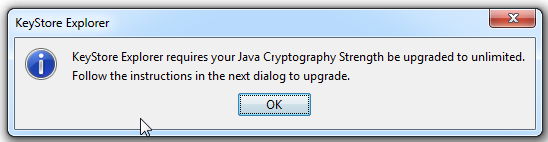
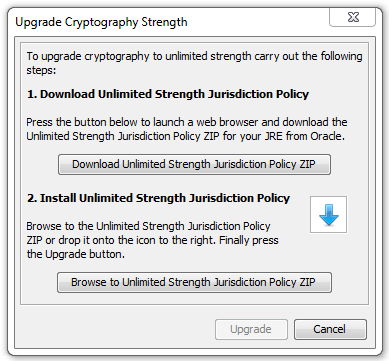
- Make a backup of the two files keystore.jks an cacerts.jks (in C:\Program Files (x86)\OperationsManager\3rdparty\payara41\glassfish\domains\domain1\config) or (in C:\Program Files\OperationsManager\3rdparty\payara41\glassfish\domains\domain1\config)
- Open the file keystore.jks (in ...\OperationsManager\3rdparty\payara41\glassfish\domains\domain1\config) and enter the password to open it (default: changeit)
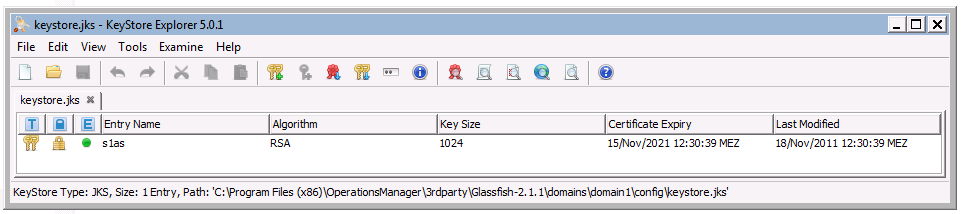
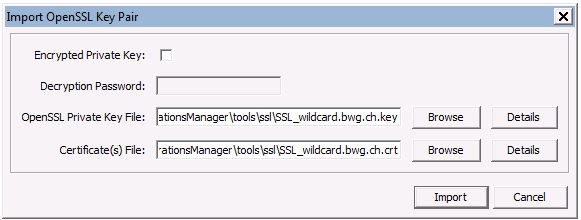
- Press Ctrl+K (Import Key Pair) and select the type OpenSSL:
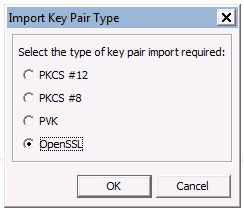
- Untick "Encrypted Private Key" an select your Private Key file (*.key) and your certificate (*.crt)
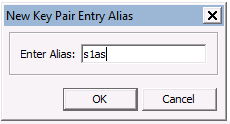
- Enter the alias s1as:
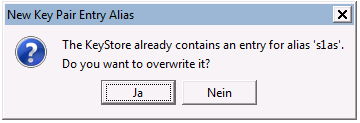
- Confirm to overwrite the existing entry:
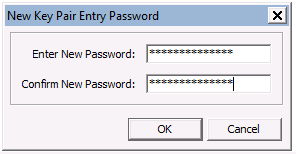
- Enter the passwort (the same as in step 5):
- Save your keystore file by pressing Ctrl+S
- Open the file cacerts.jks (in ....\OperationsManager\3rdparty\payara41\glassfish\domains\domain1\config) and enter the password to open it (default: changeit)
- Repeat steps 6 to 11 for the trusted store (cacerts.jks)
- Restart the Operations Manager
Products
Applies to OM4.7.x
Was this helpful?






0/255
Upload Attachment
File Upload
Maximum file
size allowed is 3 MB.
Supported file types:
Documents (.txt, .doc, .docx, .pdf), Images (.jpg, .png), Comma Separated Files
(.csv) Speadsheets (.xlsx, .xls)
Are you sure you want to cancel the case creation?
Case closed successfully
File Upload
Maximum file size allowed is 3 MB.
Supported file types:
Documents (.txt, .doc, .docx, .pdf), Images (.jpg, .png), Comma Separated Files
(.csv) Speadsheets (.xlsx, .xls)
Are you sure you want to close this case
| Products | Region | Phone Numbers |
|---|---|---|
| FlexNet Operations FlexNet Embedded FlexNet Publisher FlexNet Connect FlexNet Code Insight InstallAnywhere InstallShield |
North America * |
+1 630-332-2513 (toll) +1 877-279-2853 (toll-free in North America) |
| Europe * |
+44 1925 944367 (toll) +44 800 047 8642 (toll-free in Europe) |
|
| Japan * | +81 3-4540-5335 (select option 2) | |
| Australia * |
+61 3 9895 2177 +61 1800 560 603 (toll-free in Australia) |
|
|
Usage Intelligence (formerly
Revulytics) Compliance Intelligence |
Please use the Case Portal to submit your support ticket or reach out to your Revenera contact. | |
File Upload
Maximum file
size allowed is 3 MB.
Supported file types:
Documents (.txt, .doc, .docx, .pdf), Images (.jpg, .png), Comma Separated Files
(.csv) Speadsheets (.xlsx, .xls)
Revenera Assistant



Case id: 00001065
Activity: Status change: 2 hours ago