

Summary
This article gives information about how to register InstallAnywhere (versions 8.0 - 2010)Synopsis
This article gives information about how to register InstallAnywhere (versions 8.0 - 2010)
Important Note: Please make sure to install and to register the product under the same user account.
Important Note: Please make sure to install and to register the product under the same user account.
Discussion
InstallAnywhere Installers will expire after 21 days without registering the product. All projects built prior to registering can be used after expiration, provided that they are rebuilt after registering the product.
Therefore, after registering the software, you will need to rebuild every project you created in order to distribute them. InstallAnywhere does not do this automatically. If you continue to get the "This product was created with an unregistered version of InstallAnywhere" message, please save and rebuild your installer and the problem should be resolved.
To register the product, please follow these steps:
1. Launch InstallAnywhere in GUI mode, and there should be a splash screen stating the number of days, if any, remaining in your trial period. The same splash screen should have a ?Register? button.
Click the ?Register? button that should bring up a registration screen. Enter the requested information including your product serial number.
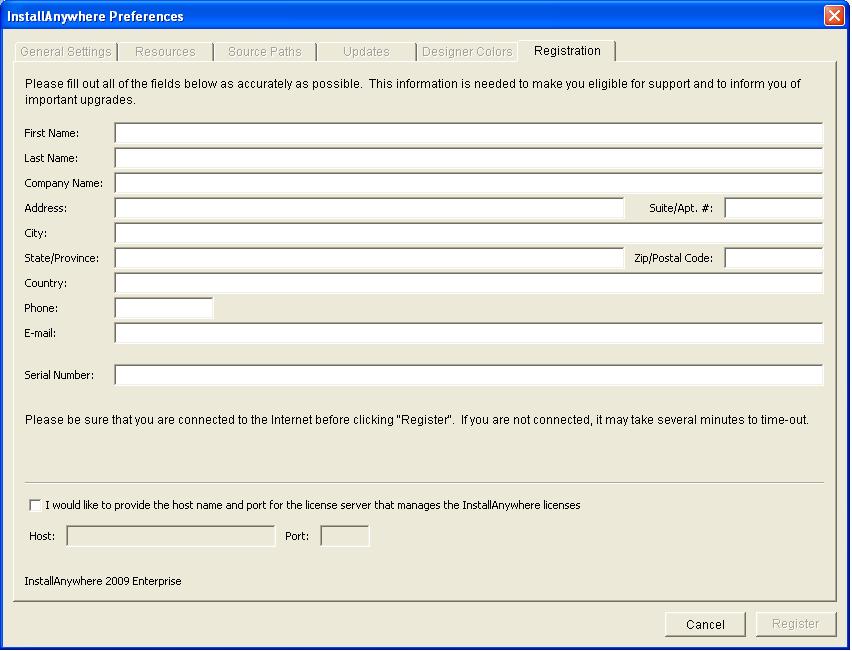
Note: Make sure the product serial number being entered follows these guidelines:
-Contains 20 characters
-All characters are capitalized
-Do not start with the letters: ISMTK
-Formatted as follows (7-3-10): XXXXXXX-XXX-XXXXXXXXXX
-No letter ?O?s? are contained in the serial number, it?s the number zero ?0?.
-Make sure to include the dashes/hyphens (-) when entering (Applies to InstallAnywhere 2009 and later only).
-There are no extra spaces either before or after the serial number
Note: Make sure the product serial number being entered follows these guidelines:
-Contains 20 characters
-All characters are capitalized
-Do not start with the letters: ISMTK
-Formatted as follows (7-3-10): XXXXXXX-XXX-XXXXXXXXXX
-No letter ?O?s? are contained in the serial number, it?s the number zero ?0?.
-Make sure to include the dashes/hyphens (-) when entering (Applies to InstallAnywhere 2009 and later only).
-There are no extra spaces either before or after the serial number
2. Then, click the ?Register? button.
If the registration were successful, there should be a dialog that states that the registration was successful.
Otherwise, if InstallAnywhere fails to establish a connection, there should be a ?Save to File? button.
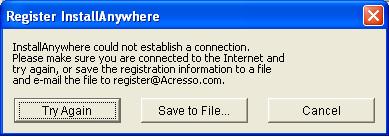
3. Click the Save to File button and save the IAReg.txt file to an arbitrary location.
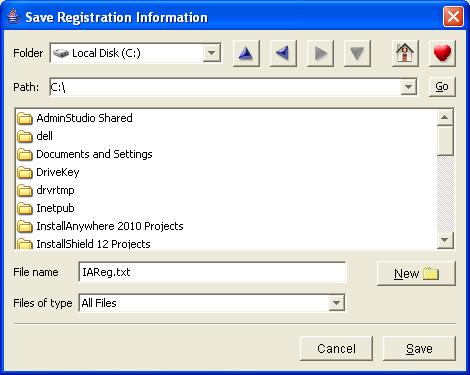
3. Click the Save to File button and save the IAReg.txt file to an arbitrary location.
4. Saving the IAReg.txt file should bring up a dialog that states whether the registration was successful.
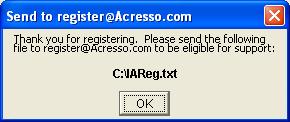
Note: The "register@acresso.com" email address is no longer valid. For all editions of InstallAnywhere, email the IAReg.txt file for our records to register@flexerasoftware.com
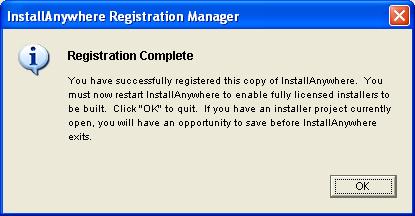
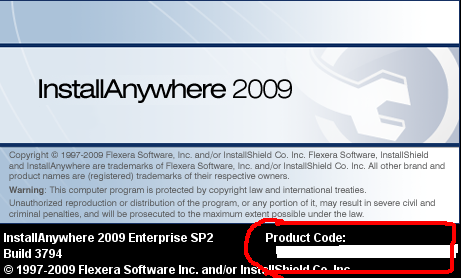
5. Clicking the OK button from the 2 dialogs above should automatically close InstallAnywhere. If the registration were successful, the next time you launch InstallAnywhere, the splash screen should display a product code.
Note: The "register@acresso.com" email address is no longer valid. For all editions of InstallAnywhere, email the IAReg.txt file for our records to register@flexerasoftware.com
5. Clicking the OK button from the 2 dialogs above should automatically close InstallAnywhere. If the registration were successful, the next time you launch InstallAnywhere, the splash screen should display a product code.
Additional Information
If unable to register product following the steps above, please make sure the following is accounted for:
1. The InstallAnywhere product is installed and registered under the same user account on the machine.
2. The user account has full administrator privileges.
1. The InstallAnywhere product is installed and registered under the same user account on the machine.
2. The user account has full administrator privileges.
3. The machine has a working internet connection.
4. The product serial number entered follows these guidelines:
Contains 20 characters
-All characters are capitalized
-Do not start with the letters: ISMTK
-Formatted as follows (7-3-10): XXXXXXX-XXX-XXXXXXXXXX (For version 2008, DO NOT include dashes/hyphens)
-No letter ?O?s? are contained in the serial number, it?s the number zero ?0?.
-Make sure to include the dashes/hyphens (-) when entering (Applies to InstallAnywhere 2009 and 2010 only).
-There are no extra spaces either before or after the serial number
4. The product serial number entered follows these guidelines:
Contains 20 characters
-All characters are capitalized
-Do not start with the letters: ISMTK
-Formatted as follows (7-3-10): XXXXXXX-XXX-XXXXXXXXXX (For version 2008, DO NOT include dashes/hyphens)
-No letter ?O?s? are contained in the serial number, it?s the number zero ?0?.
-Make sure to include the dashes/hyphens (-) when entering (Applies to InstallAnywhere 2009 and 2010 only).
-There are no extra spaces either before or after the serial number
If registering an InstallAnywhere 2011 and later product:
InstallAnywhere 2011 and later utilizes a new license verification system. For more details on registering these newer versions, please view the corresponding article:
Licensing Overview for InstallAnywhere 2011 and Later
Licensing Overview for InstallAnywhere 2011 and Later
If issues registering InstallAnywhere persist, provide screenshots illustrating the issue step-by-step. Make sure to include a screenshot that clearly displays the serial number entered, the version and edition (e.g. Standard or Enterprise) of InstallAnywhere, and any error(s) received. Please send your request to our Technical Support Team.
Was this helpful?






0/255
Upload Attachment
File Upload
Maximum file
size allowed is 3 MB.
Supported file types:
Documents (.txt, .doc, .docx, .pdf), Images (.jpg, .png), Comma Separated Files
(.csv) Speadsheets (.xlsx, .xls)
Are you sure you want to cancel the case creation?
Case closed successfully
File Upload
Maximum file size allowed is 3 MB.
Supported file types:
Documents (.txt, .doc, .docx, .pdf), Images (.jpg, .png), Comma Separated Files
(.csv) Speadsheets (.xlsx, .xls)
Are you sure you want to close this case
| Products | Region | Phone Numbers |
|---|---|---|
| FlexNet Operations FlexNet Embedded FlexNet Publisher FlexNet Connect FlexNet Code Insight InstallAnywhere InstallShield |
North America * |
+1 630-332-2513 (toll) +1 877-279-2853 (toll-free in North America) |
| Europe * |
+44 1925 944367 (toll) +44 800 047 8642 (toll-free in Europe) |
|
| Japan * | +81 3-4540-5335 (select option 2) | |
| Australia * |
+61 3 9895 2177 +61 1800 560 603 (toll-free in Australia) |
|
|
Usage Intelligence (formerly
Revulytics) Compliance Intelligence |
Please use the Case Portal to submit your support ticket or reach out to your Revenera contact. | |
File Upload
Maximum file
size allowed is 3 MB.
Supported file types:
Documents (.txt, .doc, .docx, .pdf), Images (.jpg, .png), Comma Separated Files
(.csv) Speadsheets (.xlsx, .xls)



Case id: 00001065
Activity: Status change: 2 hours ago