

Summary
This article provides steps for resolving this error after a new installation.Symptoms
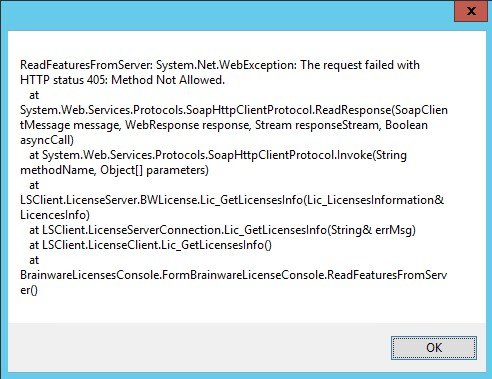
After a new installation of Columbus or Spider LCM you are receiving the following error:
Cause
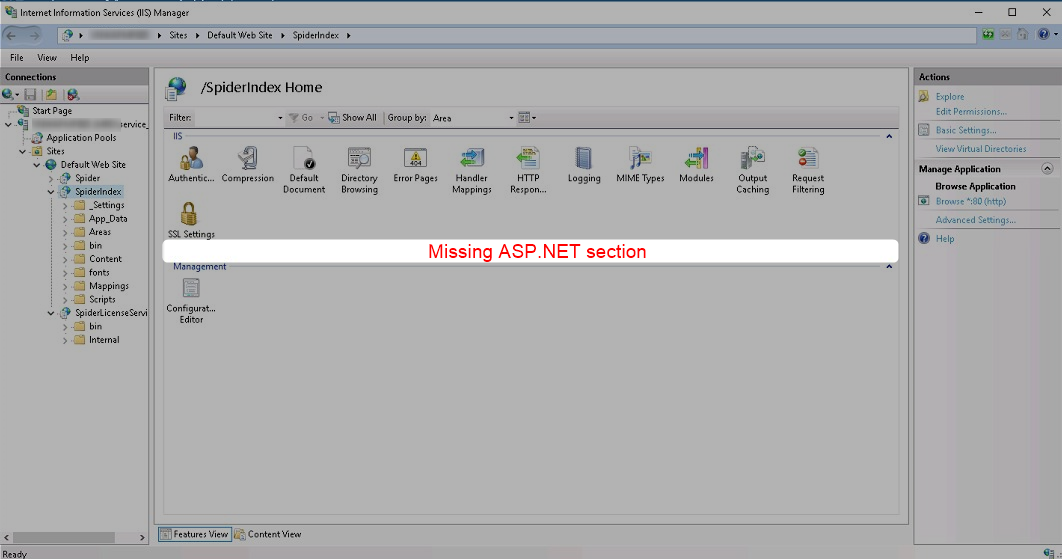
Some components (.NET Extensions) are missing in the web servers installation.
You can easily see this in the IIS Management Console
Resolution
- Open PowerShell Command Line or PowerShell ISE (as Administrator)
- execute the following script:
Write-Host "Installing .NET Framework 4.6, ASP.NET 4.6, TCP Port Sharing"
Install-WindowsFeature -Name NET-Framework-45-Core, NET-Framework-45-ASPNET, NET-WCF-TCP-PortSharing45

Write-Host
Write-Host "Installing Web Server with Features..."
Install-WindowsFeature -Name Web-Default-Doc
Install-WindowsFeature -Name Web-Dir-Browsing
Install-WindowsFeature -Name Web-Http-Errors
Install-WindowsFeature -Name Web-Static-Content
Install-WindowsFeature -Name Web-Filtering
Install-WindowsFeature -Name Web-Net-Ext45
Install-WindowsFeature -Name Web-ASP
Install-WindowsFeature -Name Web-Asp-Net45
Install-WindowsFeature -Name Web-ISAPI-Ext
Install-WindowsFeature -Name Web-ISAPI-Filter
Install-WindowsFeature -Name Web-Mgmt-Console
Install-WindowsFeature -Name Web-Scripting-Tools
- Wait until installation has completed
- If Windows asks you to reboot do so
Additional Information
Products
C7, LCM6, OM4, ESI
Was this helpful?






0/255
Upload Attachment
File Upload
Maximum file
size allowed is 3 MB.
Supported file types:
Documents (.txt, .doc, .docx, .pdf), Images (.jpg, .png), Comma Separated Files
(.csv) Speadsheets (.xlsx, .xls)
Are you sure you want to cancel the case creation?
Case closed successfully
File Upload
Maximum file size allowed is 3 MB.
Supported file types:
Documents (.txt, .doc, .docx, .pdf), Images (.jpg, .png), Comma Separated Files
(.csv) Speadsheets (.xlsx, .xls)
Are you sure you want to close this case
| Products | Region | Phone Numbers |
|---|---|---|
| FlexNet Operations FlexNet Embedded FlexNet Publisher FlexNet Connect FlexNet Code Insight InstallAnywhere InstallShield |
North America * |
+1 630-332-2513 (toll) +1 877-279-2853 (toll-free in North America) |
| Europe * |
+44 1925 944367 (toll) +44 800 047 8642 (toll-free in Europe) |
|
| Japan * | +81 3-4540-5335 (select option 2) | |
| Australia * |
+61 3 9895 2177 +61 1800 560 603 (toll-free in Australia) |
|
|
Usage Intelligence (formerly
Revulytics) Compliance Intelligence |
Please use the Case Portal to submit your support ticket or reach out to your Revenera contact. | |
File Upload
Maximum file
size allowed is 3 MB.
Supported file types:
Documents (.txt, .doc, .docx, .pdf), Images (.jpg, .png), Comma Separated Files
(.csv) Speadsheets (.xlsx, .xls)
Revenera Assistant



Case id: 00001065
Activity: Status change: 2 hours ago